How to Learn MS Paint – First Day Classes (Beginner Guide)
1. Introduction to MS Paint
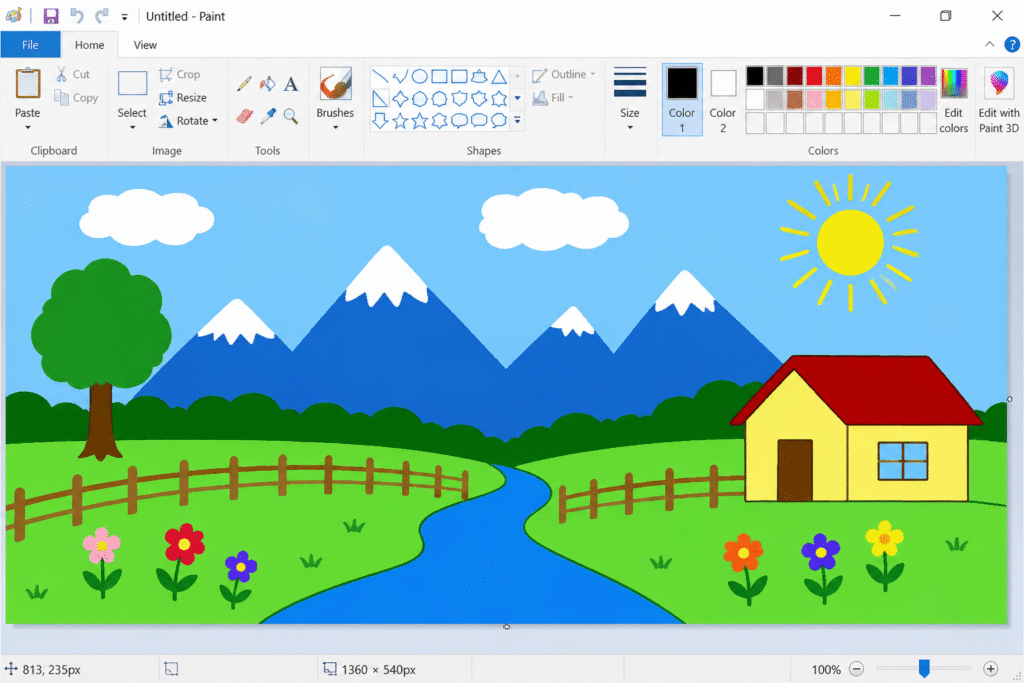
What is MS Paint?
MS Paint is a basic drawing and painting software made by Microsoft.
It comes free with Windows computers and helps users create simple drawings, coloring, shapes, and designs easily.
Uses of Paint Software
🖌️ Drawing Simple Pictures
- Draw houses, trees, cartoons, scenery, etc.
🎨 Coloring Images
- Fill colors in drawings and designs.
📝 Writing Text
- Add names, titles, or messages on images.
✂️ Editing Images
- Crop, resize, rotate, and erase parts of pictures.
📚 Educational Learning
- Helps beginners learn mouse control and creativity.
💻 Basic Graphic Design Practice
- Create posters, simple banners, logos, and art practice.
Basic Drawing & Coloring
Drawing Tools
✏️ Pencil Tool → Freehand drawing
🖌️ Brush Tool → Creative painting
🔷 Shapes Tool → Circle, Rectangle, Triangle, etc.
📏 Line Tool → Straight lines
Coloring Tools
🪣 Fill with Color Tool → Fill color inside shapes
🎨 Color Palette → Choose different colors
Beginner Practice Ideas
🏠 Draw a House
🌳 Draw a Tree
☀️ Draw the Sun
☁️ Draw Clouds
🌈 Add Colors Creatively